
Editor Help
Images & private file repositories
Reuse files, add page images and understand how access and file versions work.
Editors & Space Admins4 min read
Keep files in the relevant space so they remain permission-controlled and reusable. Images are uploaded independently of publishing, helping large pages submit without sending the image data again.
Before you start
- Editor access and file access in the destination space.
- A readable image or attachment that is approved for the intended audience.
Add an image or attachment
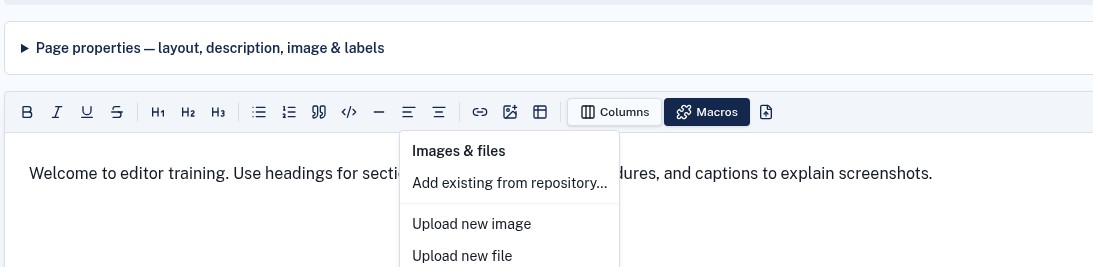
- 1In the editor, open the Images & files menu.
- 2Choose Add existing from repository to reuse a file, Upload new image for a page image, or Upload new file for an attachment.
- 3Wait for the upload to finish before submitting your revision.
- 4Check the image size and placement, or use clear link text for an attachment.
Understand access and versions
- Space repository files are private; sharing a page link does not make its files public.
- File access follows repository permissions, which may further restrict who can open a file.
- Stable file links resolve to the permitted file version rather than embedding temporary download links.
- The newest five file versions are retained. Use the repository's version controls when replacing or restoring a file.
Before publishing
Confirm the image is sharp enough to read at its displayed size, remove unnecessary sensitive details, and test attachment access for the intended audience. Add a caption when an image needs explanation.
Troubleshooting
A reader cannot open an attachment
Ask the Space Admin to check both page access and the file's repository permissions.
Submission is waiting on an upload
Let the upload complete. If it fails, retry the file upload before submitting again.